
// Getting Started with Python in SAS Viya: A Practical Guide
If you've been using Python alongside SAS 9, you're probably used to treating it as a separate tool. SAS Viya changes that. Python is no longer just something you call from the outside, it is deeply integrated into the platform, allowing you to combine the strengths of both languages in a single workflow.
In this blog, we'll walk through three core capabilities to get started with Python in SAS Viya:
-
Run Python code from within SAS using PROC PYTHON
-
Understand how Python packages are managed in SAS Viya
-
Connect directly to Cloud Analytic Services (CAS) using the SWAT package
In order to keep it clean, all the code shown in the images can be found on another page. Click HERE for the all the code corresponding to the examples.
- Running Python with PROC PYTHON
PROC PYTHON allows you to execute Python code directly from a SAS program. This is particularly useful if you're extending an existing SAS workflow with Python libraries, without leaving your SAS environment.
A minimal example looks like this:
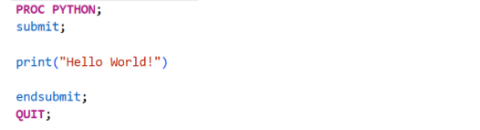
While this example is intentionally simple, the real value lies in leveraging Python's extensive ecosystem of libraries:
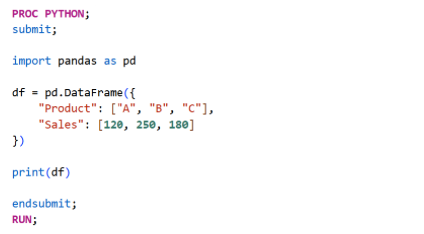
Because PROC PYTHON runs Python directly from a SAS program, you can extend existing SAS flows with Python libraries without having to rewrite your complete workflow in Python. SAS datasets can be shared with Python and vice versa, making it straightforward to combine existing SAS code with Python libraries.
- Managing Python Packages
In many SAS Viya environments, Python packages are managed through isolated Python environments rather than a single shared installation. Each environment contains its own set of packages and dependencies, allowing different projects to use different package versions without interfering with one another.
Before installing packages, SAS must be configured to use the correct Python environment. The following example switches PROC PYTHON to a virtual environment called projectx, and installs all packages defined in a requirements.txt file. This requirements file simply lists the Python packages (and optionally versions) required for a project.
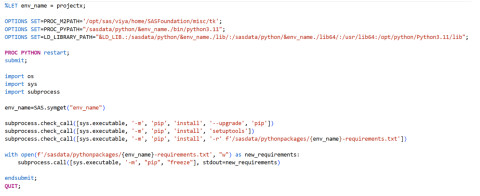
Let's break down the most important things that happen here:
-
PROC_PYPATH points SAS to the Python executable inside the desired virtual environment.
-
LD_LIBRARY_PATH ensures the required shared libraries for that environment are available.
-
PROC PYTHON restart restarts the embedded Python interpreter so the new environment is picked up.
-
pip install -r installs all packages listed in a project-specific requirements.txt file.
-
Finally, pip freeze writes the exact package versions back to the same file, creating an up-to-date snapshot of the environment.
This approach has several advantages over installing packages individually:
-
All project dependencies are stored in a single requirements.txt file.
-
New environments can be recreated with a single command.
-
Package versions remain consistent across development, test, and production environments.
-
Changes to installed packages are automatically captured for future deployments.
By treating your Python environment as part of your project rather than something configured manually on the server, you make your code easier to reproduce, share, and deploy. This is especially valuable in enterprise environments where multiple projects and teams may require different package versions.
- Connecting to CAS with SWAT
While PROC PYTHON embeds Python inside a SAS program, the SWAT (Scripting Wrapper for Analytics Transfer) package lets Python communicate directly with CAS. This is ideal if you're primarily working in Python, for example in Jupyter Notebook or VS Code, but want to use the processing power of the CAS engine.
Let’s start by installing the SWAT package:
pip install swat
Once installed, connecting to CAS only requires a few lines of code:
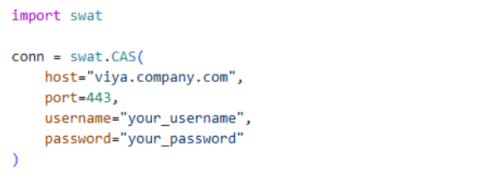
However, in production environments, it's common to authenticate using an OAuth access token rather than embedding usernames and passwords in code:
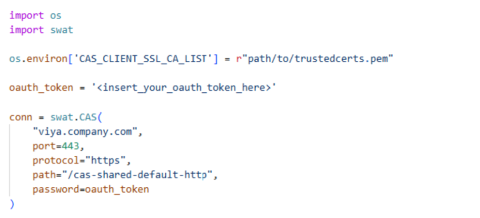
After establishing a connection, you can immediately start interacting with CAS: inspecting available tables in a specific caslib, loading a CAS table, retrieving rows from it, or calculating summary statistics:
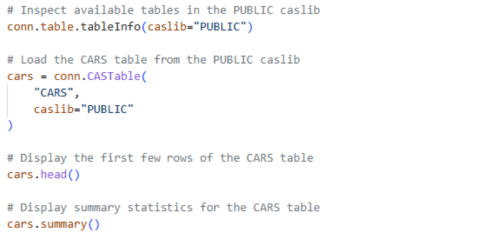
Notice that these operations execute in CAS rather than pulling the entire table into your Python session.
- Moving data between pandas and CAS
Many Python users already work with pandas. SWAT makes it easy to exchange data between pandas and CAS. For example, uploading a pandas DataFrame to CAS is straightforward with the upload_frame function:
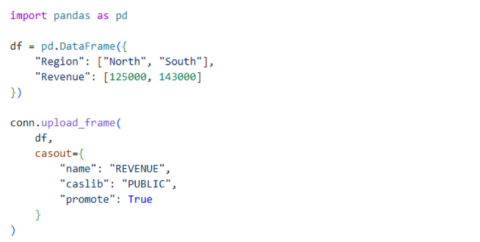
Retrieving data from CAS is just as straightforward:
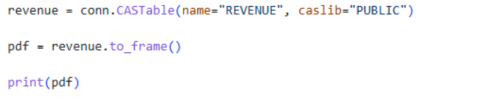
For large datasets, it is usually more efficient to keep the data in CAS and only retrieve the results you need for analysis in Python.
Conclusion
If you're already familiar with SAS programming and Python, getting started with Python in SAS Viya is easier than many SAS users expect.
PROC PYTHON is a natural choice when you want to enhance existing flows or SAS programs with Python code. When you're developing directly in Python, SWAT provides a powerful interface to CAS, allowing you to analyze enterprise-scale data without leaving your preferred development environment.
Together, these capabilities let you combine the flexibility of Python with the scalability and governance of SAS Viya.
// Contact
Notilyze B.V.
Stationsplein 45 A4.004
3013 AK Rotterdam
+31 (0)10 79 86 295
info@notilyze.com

